
AudioVista Audio Description

Hear the details that bring it to life.

A glance between characters. A boat slipping into darkness. AudioVista describes the action as it happens, so blind and low-vision audiences can share the moment.

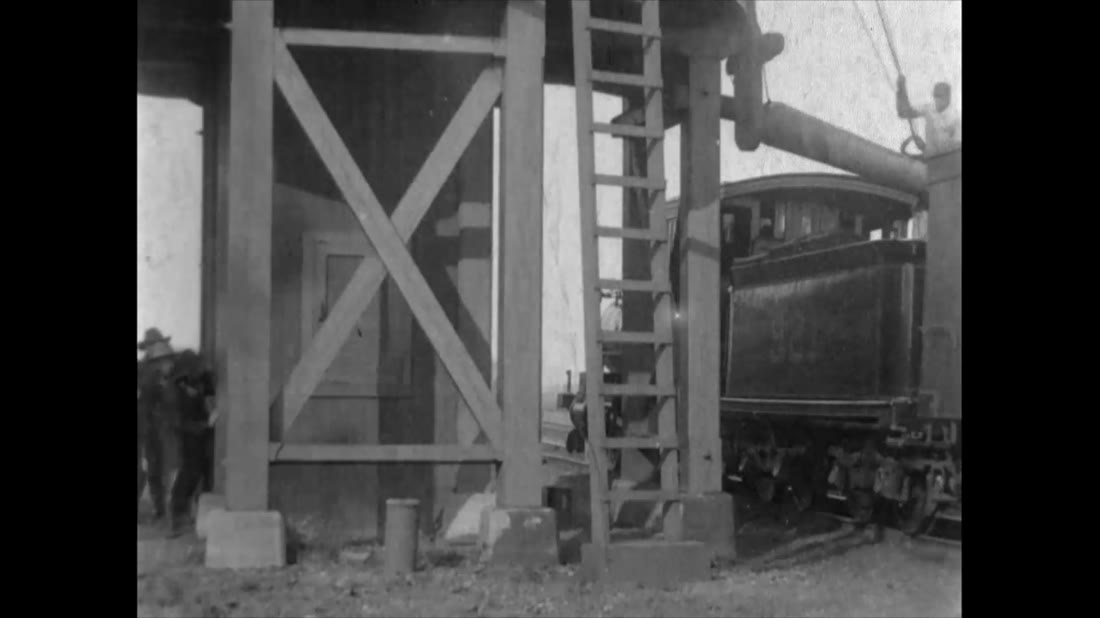
A steam locomotive pulls up beside a wooden water tower.
The Great Train Robbery · Library of CongressPlay the scene

Hear what description adds.

Press Play on any example right here in your browser. The film clips mix the original soundtrack with AudioVista narration. The ride and YouTube samples let you hear the narration on its own.

Films

Hear the music and effects come through as the narrator describes what happens on screen. Use the video controls to turn on English captions.

Steamboat Willie

1928 · Animated comedy · 41-second excerpt

Hear the narration follow Mickey’s tussle with Captain Pete while the cartoon’s music and sound effects still come through.

Read the narration transcript

Captain Pete enters. He stretches Mickey. Pete lets go. Mickey snaps back into shape, landing on his feet. Pete scowls and points Mickey toward the stairs. Mickey thumbs his nose. Pete kicks his own rear. Mickey falls downstairs into a bucket. A parrot cackles at Mickey. Mickey traps the parrot under the bucket.

Film source · Internet Archive

The Great Train Robbery

1903 · Silent Western · 37-second excerpt

Follow the bandits from their hiding place to the moving train, with timed narration that tracks the action.

Read the narration transcript

A steam locomotive pulls up to the tower and stops. A worker refills the tender while the bandits remain hidden behind the tower. Two bandits slip out from behind the tower supports and climb between the cars as the train pulls away.

Film courtesy of the Library of Congress

Rides & attractions

Hear how a timed script follows the scenery and movement through three different ride recordings.

Original Magic Kingdom ride · 48 sec

Splash Mountain

Follow the log from the dark lift hill into daylight and down toward the briar patch.

Read narration transcript

The log floats through the curved cavern flume lined with rock walls, approaching an ascending conveyor lift hill ahead. The log continues ascending the steep cavern incline toward the exit ahead. To the left, Br'er Frog sits sheltered on a rocky ledge. The log crests into daylight. It plunges over the crest toward the briar patch. The log curves through a briar-filled pond overlooked by Frontierland. Turning past thorny brambles, the flume heads toward a wooden barn at the mountain's base.

Magic Kingdom · 45 sec

Pirates of the Caribbean

Hear how the description establishes the canal, then picks out lanterns, blue light, and rock formations.

Read narration transcript

The boat glides along a stone canal past the boarding dock, trailing another vessel beneath iron wall lanterns. The canal continues straight through an arched, dimly lit stone tunnel. The canal slips beneath a low, rocky opening. The boat glides under a low, dark rocky overhang, facing deep blue lighting ahead. Blue uplighting illuminates jagged rock formations lining the dark water. Long stalactites hang overhead in the blue light.

Magic Kingdom · 39 sec

Tiana’s Bayou Adventure

Track the sights and movement as the flume leaves the loading area and climbs toward daylight.

Read narration transcript

The flume drifts out from loading. Stacked wooden crates, barrels, and burlap sacks line the red-rock cavern walls along the water's edge. Ahead, a log vehicle ascends an incline toward an arched opening glowing with daylight. Mechanical rollers engage beneath the vehicle, carrying it up the lift hill. The log continues climbing the steep conveyor through the cavern, trailing the other vehicle toward the arched daylight.

Independent AudioVista demos based on recordings. Attraction operators do not provide these samples.

YouTube examples

Play our narration samples, read their timed scripts, or watch the original videos on YouTube.

NASA JPL · Field footage

Ingenuity’s first flight

Rotors spin up, dust rises, and the Mars helicopter climbs and hovers.

Read narration transcript

The Ingenuity helicopter stands on the rocky Martian plain. Its twin rotors begin spinning, quickly accelerating. It lifts straight up into the air, kicking up dust beneath it. Ingenuity hovers steadily several meters above the surface.

SL diys · Hands-on tutorial

Fold a paper airplane

Follow the folds, from the triangular base to the wings.

Read narration transcript

Hands fold the top into a triangular base. The flaps are squash-folded into flat diamonds. The center is reshaped into two pointed prongs. The wings are folded outward. Audio description provided by AudioVista.

Try it on your phone.

Use a browser to set up the demo and AudioVista on your phone to listen through your own headphones or speaker.

Watch a film with Showtime

  1. In your browser, choose a film and enter the address where you’ll try the demo. Select Start cinema demo.
  2. At that address, open AudioVista, allow location access, and choose Start the Show for your film.
  3. Play, pause, or skip in your browser. The description on your phone follows the movie.
Try the cinema demo

Start a ride with AudioVista Places

  1. Pick a ride and find the address where you and your phone will try it. Select Set up this demo.
  2. Open AudioVista at that address with location access and wait for the browser to show your phone is ready.
  3. Select Start experience in the browser. Your phone plays the description from the scheduled start.
Try the ride demo

Bring your own experience to life.

Give visitors a way to hear the details at your attraction, on a tour, or during a screening.

Create a ride, tour, or attraction

Build your experience in My AudioVista with AudioVista Places.

  1. Sign in, enable hosting from My account if needed, and choose Add a place.
  2. Set the location. Upload narration, or paste a script and generate spoken audio.
  3. In Manage my Places, open Playback settings. Offer audio in the nearby menu, or choose Queue playback and set a start trigger. A host can prepare and start the Queue from the operator console.
Create in My AudioVista

Have AudioVista create a description

Send us a video or ride-through you have permission to use. We’ll confirm the exact version, write and time the narration, and work with you on review and delivery.

For a venue, tell us how visitors move through the experience and where the audio should begin. For a film or web video, tell us where audiences will watch it.

Tell us about your project

Make your video catalog accessible.

Our Audio Description API is designed for media owners, broadcasters, studios, educators and creators who want to expand accessibility across their existing and future content. It turns a YouTube or hosted video link into a time-synchronized description script, with optional guidance for the focus and tone and separate subtitle and Spanish translation files on request.

Whether you're describing one film or integrating description into your publishing workflow, we'd love to hear about your project.

Explore the Audio Description API and request access